वेबसाइट पर
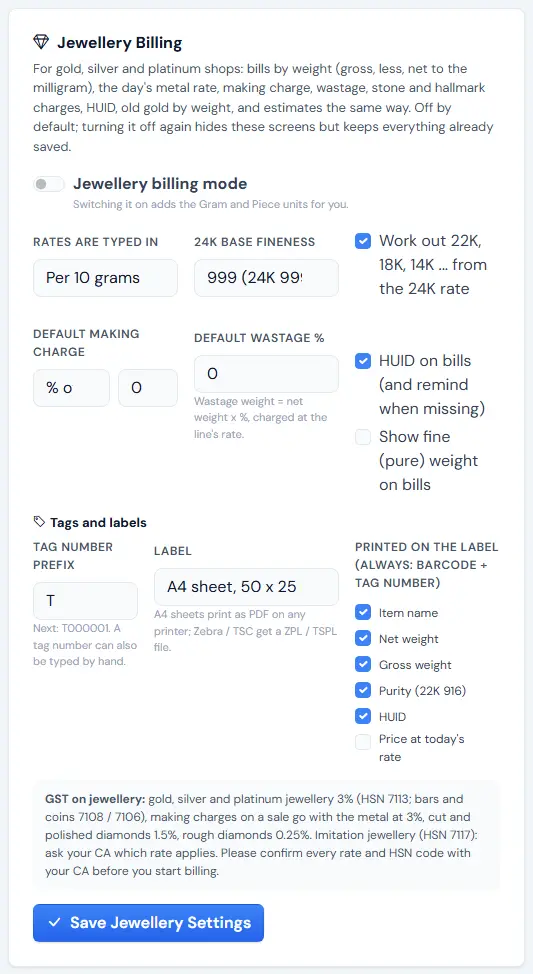
- साइडबार SYSTEM → "Settings", "Jewellery Billing" कार्ड ढूँढें।
- "Jewellery billing mode" चालू करें (Gram और Piece यूनिट अपने-आप जुड़ जाती हैं)।
- "Rates are typed in": "Per 10 grams" या "Per gram", और "24K base fineness" (999 या 995) चुनें।
- सिर्फ़ 24K का भाव डालते हैं तो "Work out 22K, 18K, 14K ... from the 24K rate" टिक करें।
- "Default making charge" (मेटल वैल्यू का % / प्रति ग्राम / प्रति नग फ़्लैट) और "Default wastage %" डालें।
- चाहें तो "HUID on bills (and remind when missing)" और "Show fine (pure) weight on bills" टिक करें।
- "Tags and labels" में "Tag number prefix" और लेबल का साइज़ चुनें।
- "Save Jewellery Settings" दबाएँ।
ऐप में
☰ Menu → Settings → "System" टैब → "Jewellery Billing" कार्ड → "Jewellery Settings"। वही विकल्प; "Save Jewellery Settings" दबाएँ।
क्या बदलता है
- नए मेनू: "Today's Rates", "Tags", "Job Cards" (ऐप: "Job cards"), "Orders" और "Jewellery Reports"। ऐप के Quick Bill में "Job work (repair) bill" लिंक भी आता है।
- बिल "Items (by weight)" बन जाता है — ग्रॉस / कम / नेट वज़न, मेकिंग, वेस्टेज, स्टोन और HUID के साथ।
- एक्सचेंज कार्ड "Old Gold Taken In" बन जाता है।
- आइटम और पार्टी फ़ॉर्म में ज्वेलरी और KYC के खाने आते हैं; कोटेशन वज़न वाले एस्टीमेट बन जाते हैं।
सलाह: बाद में बंद करने पर ज्वेलरी स्क्रीन छिप जाती हैं, पर सेव डेटा बना रहता है।
